
Inside GeM: What the Government Buys, Who Wins & At What Price (2026)
Published On: 18 July 2026
You found a bid. You prepared the documents. You quoted your best price. The bid closed... and then, silence. Weeks later you come to know you lost. Who won? At what price? How far were you from the winning price? GeM does not send you any message with this answer.
But the answer exists — publicly, on GeM itself. And the sellers who know how to read it bid very differently from everyone else.
In this article, we will cover both sides of GeM that every seller should know. First: what the government actually buys — from a ₹500 stationery order to machinery worth crores — category by category. Second: how to check the result of any bid — who won, and at exactly what price — step by step. (Completely new to GeM? First read our What Is GeM? Complete Guide, then come back here.)
In this guide: what the government buys, category by category · small orders to big orders · how to check any bid's result · what bid statuses mean · how winning prices make you a smarter bidder.
Part 1: What does the government actually buy on GeM?
The short answer: almost everything. In FY 2025–26 alone, buying through GeM crossed ₹5 lakh crore. And 68% of those orders were completed by micro and small enterprises — sellers just like you.
Think about it in a simple way. The government runs lakhs of offices, schools, hospitals, police stations, courts, army camps, and workshops across India. Every one of them needs things to run — every day, every month, every year. All of that buying happens on GeM.
And it happens at every size. On the small side, a village school orders two ceiling fans. On the big side, a ministry orders thousands of laptops, or a state buys hundreds of vehicles. And small sellers are not limited to small orders — AIIMS Jhajjar recently floated a bid for 15 lakh surgical gloves (GEM/2026/B/7785387), and bids like these are often won by MSME suppliers, not big multinationals.
Let us go category by category, so you can find where your business fits.
1. Office supplies & furniture
The bread and butter of GeM. Every office needs chairs, desks, almirahs, files, registers, pens, paper, staplers, whiteboards, and notice boards. These items are ordered again and again — when a new office opens, when old furniture breaks, when the new financial year's budget comes. If you make or trade any of these, there are tenders for you on GeM almost every day. Order sizes go from a few thousand rupees to lakhs — for example, one recent bid asked for 200 office chairs for a single government office.
2. Computers, electronics & IT equipment
Desktops, laptops, printers, scanners, projectors, UPS systems, CCTV cameras, biometric attendance machines, networking equipment — almost every department buys IT items. Government offices across India are going digital, so this category keeps growing. Along with the products, there are also contracts for installation and yearly maintenance (AMC). A computer trader in a small city can supply to the local court, the district hospital, and the tehsil office — all through GeM.
3. Medical & hospital supplies
One of the biggest categories on GeM. Government hospitals — from AIIMS to your district hospital — buy gloves, masks, syringes, medicines, injections, bandages, hospital beds, wheelchairs, lab chemicals, and testing equipment. Quantities here are often very large, because hospitals serve thousands of patients every day. Real examples from July 2026: 15 lakh surgical gloves for AIIMS Jhajjar, and 1.5 lakh newborn baby nappies for AIIMS Delhi. If you supply anything medical, GeM should be your first market.
4. Electrical & construction material
Wires, cables, switches, LED lights, fans, transformers, pipes, cement, paint, steel items, sanitary fittings — these are bought by electricity boards, public works departments, municipal bodies, and housing boards. Government buildings always need repair and new construction, and the material comes through GeM tenders. Even a single gram panchayat buys here — we saw a panchayat in Bihar float a bid for a water treatment plant.
5. Vehicles & transport
States and departments buy cars, buses, ambulances, tractors, and two-wheelers on GeM — plus tyres, batteries, and spare parts. And it is not only about buying: vehicle hiring is a big service category, where offices hire taxis and buses on monthly contracts. If you run a travel or transport business, those hiring tenders are for you.
6. Food, kitchen & daily-use items
The Army, hostels, hospitals, and jails run some of the biggest kitchens in India — and those kitchens shop on GeM. Tea, ration items, cooking utensils, gas equipment, dustbins, soaps, phenyl, cleaning material. A real example: the Indian Army recently floated a bid for 8,460 kg of CTC tea in Madhya Pradesh. Ordinary products, very big quantities — and they get ordered again every few months.
7. Uniforms, textiles & safety gear
Police, railways, defence, schools, and hospitals all wear uniforms — shirts, trousers, shoes, belts, caps. Add safety helmets, jackets, and gloves for factory workers, plus tents, bags, blankets, and flags. Most textile and garment makers think only of the private market. Meanwhile, government uniform tenders run all year, with quantities in the thousands.
8. Services — you don't need to sell a product at all
This surprises many people: GeM is not only for products. Government offices post service tenders daily — security guards, housekeeping and cleaning, catering, manpower supply (data entry operators, drivers, helpers), gardening, pest control, printing services, vehicle hiring, equipment repair, and even digitisation (a Defence Estates office in Punjab recently floated a bid to scan 5 lakh pages of old files). If your business "does work" instead of "making things," GeM has a steady stream of contracts for you.
Two things to notice before we move on
- Repeat demand is the real gold. Gloves, tea, stationery, cleaning services — buyers come back for these every few months. Win once, deliver well, and the next tender becomes easier: you know the specs, the documents, and (after Part 2) the winning price range.
- The demand is near you. These buyers are not only in Delhi. Your district hospital, local university, municipal office, and nearby army establishment all buy through GeM. Supplying locally means lower delivery cost — and often fewer competitors.
Whether GeM fits your business today — GST, cash flow, delivery reach — is a separate question. We have answered it honestly, with a 5-point self-check, in our GeM for Small Businesses & MSMEs blog.
Finding your bids in this ocean
After reading all this, one thing is clear: GeM is huge. Thousands of categories, tens of thousands of live bids, buyers in every district of India. That is great news for demand — but it also creates a very practical problem. Somewhere in that ocean are the ten bids that match your business, and finding them by scrolling the portal every day is real, tiring work.
This is where BidSetu makes life simple. Its filters show you only the bids that match your business — select your category, and the noise disappears. Add your state, and you see only the bids you can actually serve. Set it once, and after that, every new matching bid comes to you as an alert the moment it goes live — no daily scrolling, no missed tenders. The tenders you read about above? Filters like these found them in seconds.
So this is the buying side: everything, everywhere, on repeat. Now let us see the side almost nobody uses — when these bids close, who wins them, and at what price?
Part 2: How to check any bid's result — who won, and at what price
Here is GeM's most useful open secret: bid results are public. When a bid is decided, GeM publishes which sellers took part, what price each one offered, and who won. Anyone can see it — no seller account, no login.
Most sellers never open a single result. Let us fix that, step by step.
Step 1: Open the public bid page
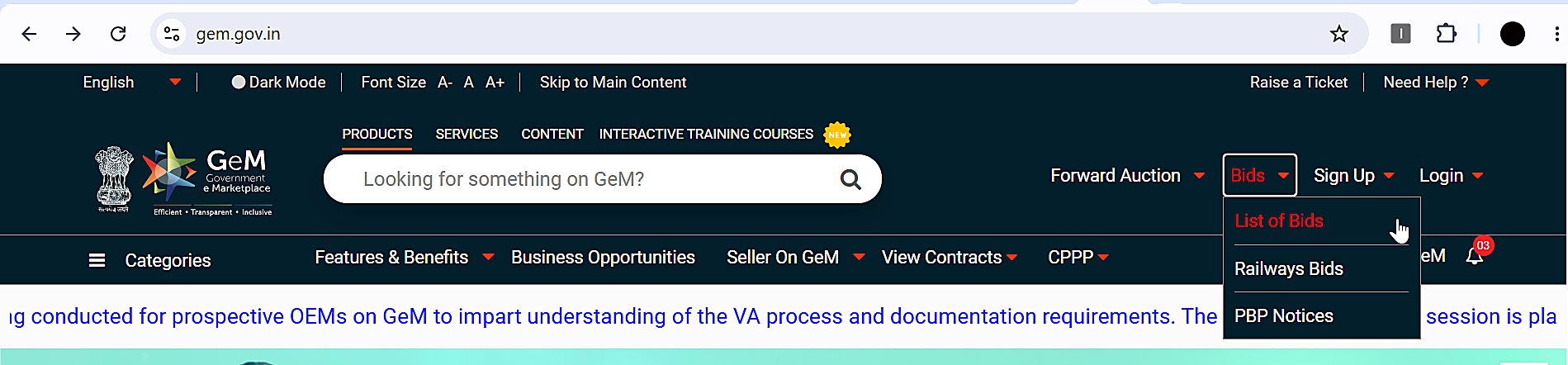
Go to bidplus.gem.gov.in — this is GeM's public bid section (you can also reach it from gem.gov.in by clicking "List of Bids"). Current and recently closed bids on GeM are listed here.
Step 2: Filter by "Bid/RA Status"
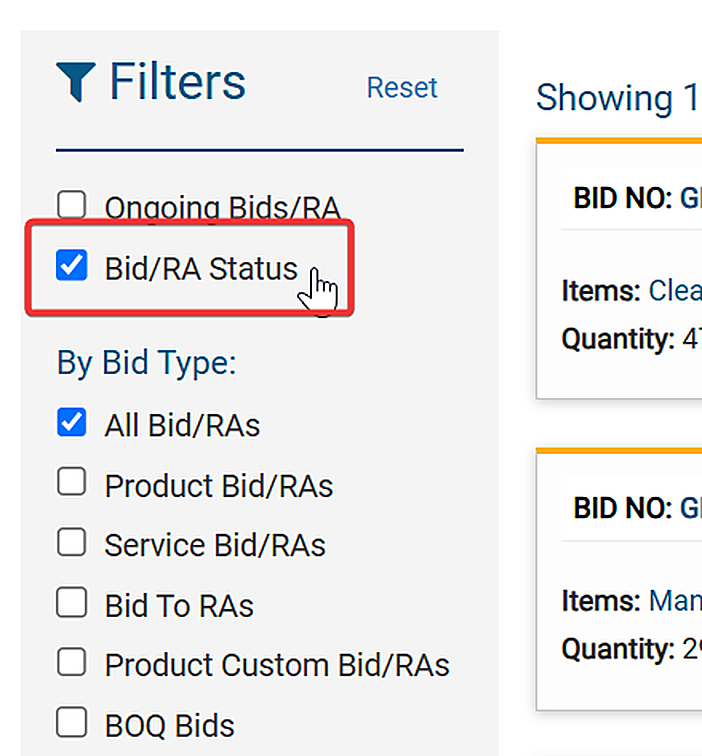
On the listing page, you will see a filter called "Bid/RA Status." This is the key that most sellers never touch. Tick that checkbox, and you can filter bids by their current status. To see decided bids, select "Awarded."
Step 3: Understand what the status means
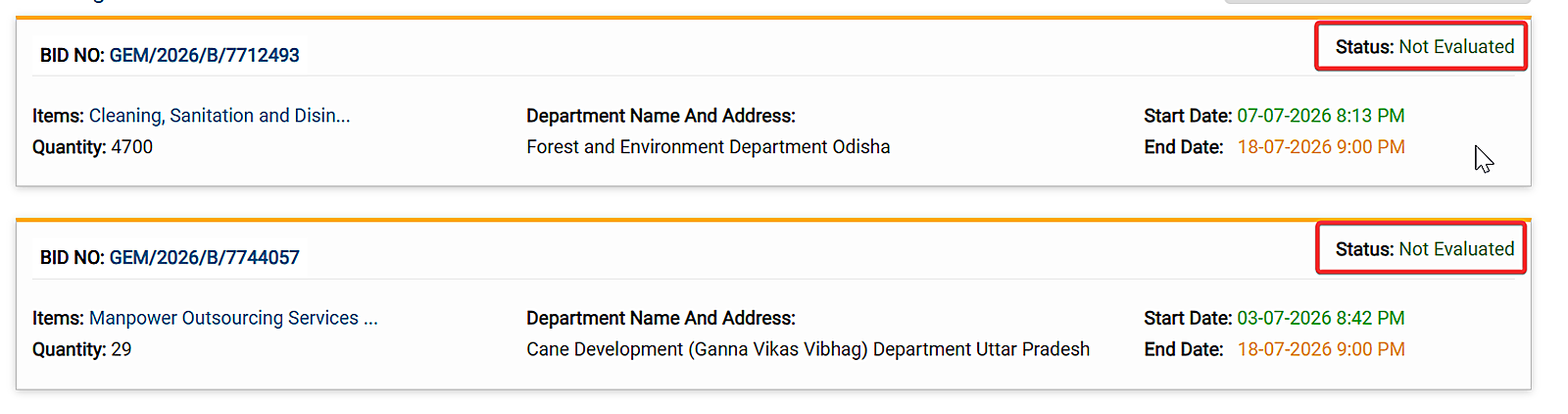
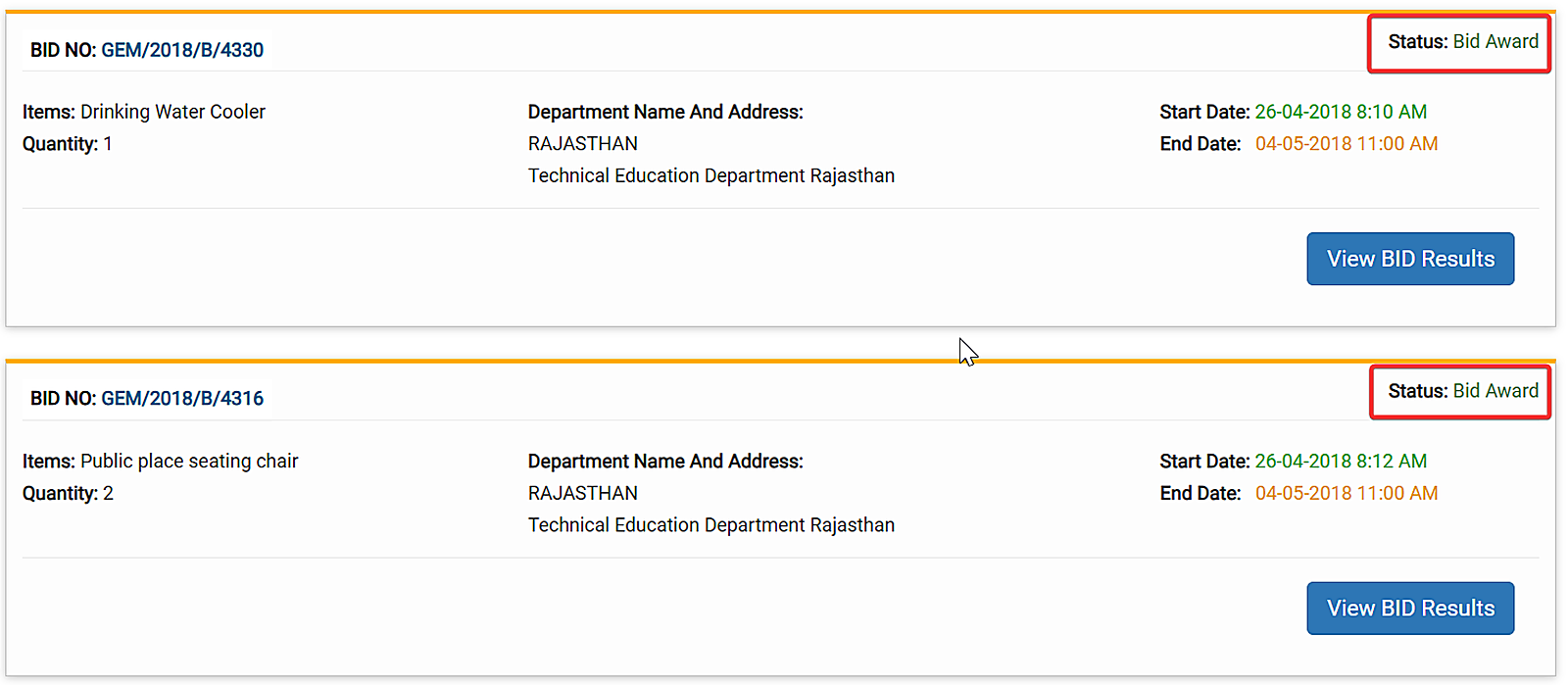
Every closed bid carries a status, and each status tells you something:
- Not Evaluated — the bid has closed, but the buyer has not finished checking the bids yet. No result to see; check back after a few days.
- Technical / Financial Evaluation — checking is going on. In two-packet bids, documents are checked first, and prices are opened only for the sellers who pass.
- Awarded — the bid is decided. The result is published — and this is where the gold is.
- Cancelled — sometimes a buyer cancels a bid (wrong specs, no eligible sellers). It happens; move on.
Step 4: Open the result
On an awarded bid, open its result view. You will see a table of the sellers who qualified, and for each one:
- The seller's name — your real competitors, by name
- The price they quoted — actual numbers, not estimates
- Their rank — L1, L2, L3… — arranged from the lowest price to the highest. L1 (lowest) normally wins the order. (L1, two-packet bids, and other terms are explained in simple words in the key terms section of our Complete Guide.)
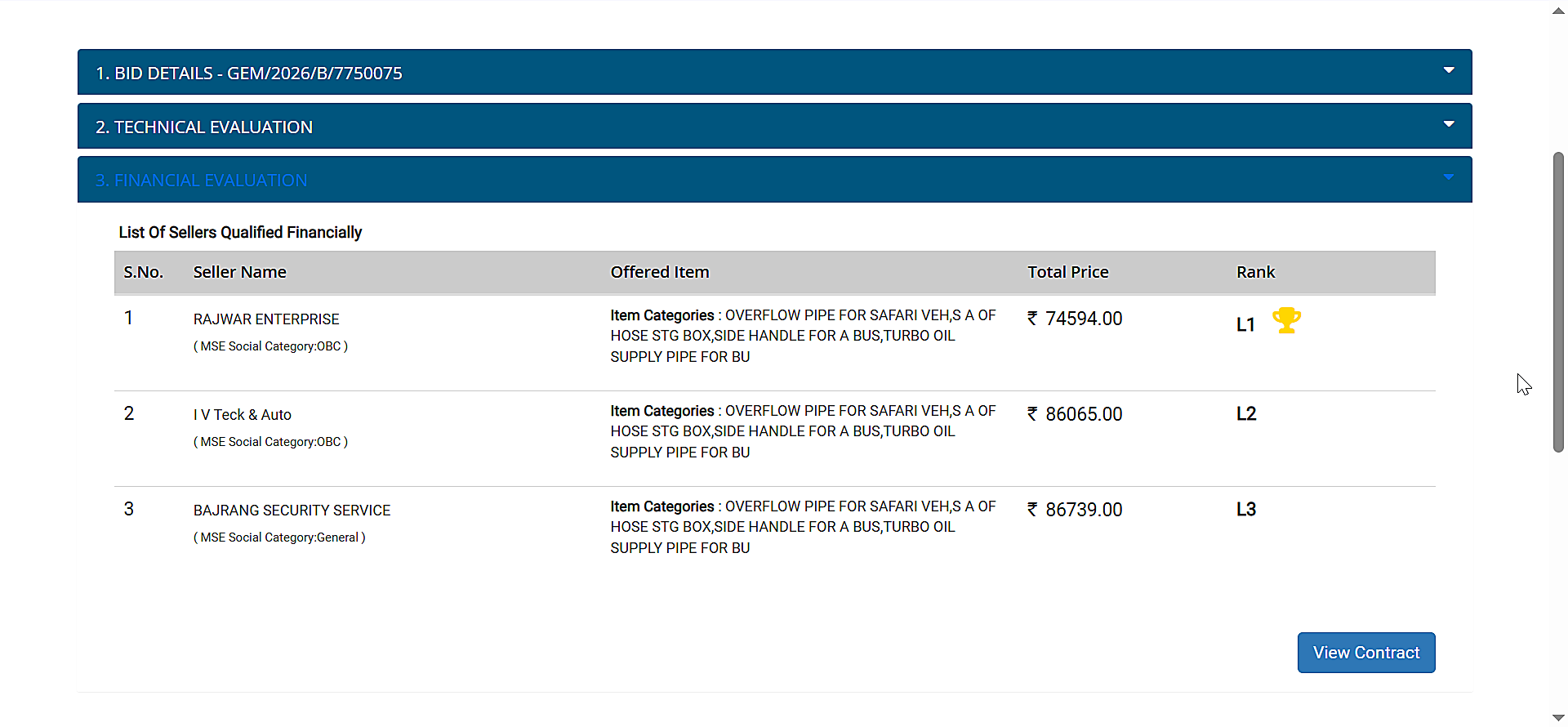
What a real result looks like — and how to read it
Here is a real result we checked while writing this article: a denting & painting work bid (GEM/2026/B/7718686). Four sellers reached the final round:
- L1 — ₹12,500 → winner
- L2 — ₹15,500
- L3 — ₹17,890
- L4 — ₹1,48,879
These four lines carry three lessons:
Lesson 1 — The gap between L1 and L2 tells you the state of the market. The winner quoted ₹12,500; the next seller quoted ₹15,500 — a 24% gap. This means most sellers were guessing, and a well-researched price wins easily. When the gap is small (2–10%), the sellers know the market well, and you must work harder on your costing to compete.
Lesson 2 — Never be the blind quote. Look at L4: ₹1,48,879 — more than ten times the winning price. That seller did zero research and had no chance from the start. One look at a past result would have saved them the whole effort.
Lesson 3 — The competition is smaller than you fear. We studied 600+ GeM bid results from July 2026, and most bids had only 3 to 5 sellers in the final round. Not hundreds — just a handful. And as L4 shows, some of that handful is pricing blind. A prepared seller with the right documents and a researched price is often truly competing with just one or two others.
Turn results into your price file
Checking one result is interesting. Checking results regularly is a real advantage. Three simple habits:
- Before bidding: open the last 3–5 results of similar bids in your category and note the L1 prices. That range is your market rate — quote inside it, or know exactly why you are not.
- After losing: open the result as soon as it appears. Were you 5% above L1? Sharpen your rate. 40% above? Redo your costing, or change your category. A loss without checking the result teaches you nothing; with it, every loss becomes a lesson you have already paid for.
- Every month: note who keeps winning in your category, and at what price. Ten minutes a week builds a price file your competitors simply do not have.
The honest limitation — and the shortcut
On GeM's website, all of this is one bid at a time. There is no combined page of recent results in your category, no price history, and no way to search across results. Building your price file by hand is slow — which is exactly why most sellers never do it, and why the few who do keep winning.
This is the gap BidSetu was built to close. Along with every live bid in your category and state (with instant alerts), BidSetu tracks bid results with the actual winning L1 prices — searchable in one place, category by category. Instead of opening fifty result pages, you see your category's recent winning prices on one screen, right next to the live bids you are about to quote on. And if you get stuck on a tender or a document, Call Assist puts a real person on the phone to guide you. It is free to start, no card needed — begin by checking the result of your last lost bid today.
Conclusion
GeM runs in the open. What the government buys is public — everything from tea and gloves to vehicles and machinery, at every level from a gram panchayat to AIIMS, again and again. Who wins, and at what price, is public too — sitting in result pages most sellers never open. The winners on GeM are not luckier or better connected. They use data that others ignore: they pick repeat categories, they know their real competition by name, and they never quote a price without knowing what won last time.
BidSetu is an independent platform that indexes publicly available GeM data. We are not affiliated with GeM or the Government of India.