
What Is GeM? The Complete Guide for Indian Sellers
Published On: 26 June 2026
If your business wants to win government orders, this is where it happens. This guide explains GeM from zero — what it is, how it works, and how you actually sell on it — in plain English, with real screenshots and examples.
In this guide: what GeM is · why sell on it · how it works · who's on it · what you need to start · the seller's journey · finding and understanding bids · MSME benefits · common mistakes · key terms.
What is GeM? (and what does GeM stand for)
GeM stands for Government e-Marketplace. It's the official online platform where government departments buy the goods and services they need — and where any registered business can sell to them. Think of it as the government's own version of Amazon or Flipkart: one website, gem.gov.in, where ministries, departments, schools, hospitals, and PSUs do their shopping, and sellers across India list what they offer. Same idea as the apps you already use — just with the government as the customer.
Before GeM, selling to the government meant paperwork, physical tenders, and a lot of middlemen deciding who got in — run through the old DGS&D (the Directorate General of Supplies and Disposals). It was slow, opaque, and hard for a small business to crack. So in August 2016, the Ministry of Commerce and Industry launched GeM to move the whole thing online: contactless, paperless, cashless. The DGS&D was shut down by the end of 2017 — GeM replaced it completely.
GeM is run by a government-owned, non-profit company (the GeM SPV) under the Department of Commerce. It's not a private marketplace skimming a cut of your sales — it's public infrastructure built to make government buying transparent and open to everyone, including first-time and small sellers.
Here's the part that matters most to you as a seller: using GeM is mandatory for government buyers. Under Rule 149 of the General Financial Rules, government departments are required to procure through GeM. So the demand isn't scattered across random channels — by law, it's funnelled onto one platform. When a school, hospital, ministry, or PSU needs to buy, GeM is where they go.
Today it's the largest public-procurement platform in India — covering both products and services, across every category, with buyers in all 36 states and union territories.
Why sell on GeM?
Selling to the government used to mean knowing the right people. On GeM it means showing up with the right bid. And the single biggest reason to be here is simple: you're not hunting for customers — the buyers have already shown up and posted exactly what they want to buy, with a budget behind it.
That one shift changes everything:
- The demand is already there, in the open. Tens of thousands of live bids at any moment, across every category and state. You're not generating leads — you're choosing from buyers who have already raised their hand.
- The biggest buyer in India, on one platform. Instead of a handful of local clients, you can reach government buyers nationwide — no sales team, no travel.
- A small, unknown firm can win on merit. Evaluation is transparent and rule-based: the criteria are published upfront, and the order goes to the bid that fits at the right price — not to whoever has the best contacts.
- The rules tilt toward small businesses. Registered MSEs get real, legally-backed advantages — EMD exemption, tenders reserved for them, and purchase preference (more on that below).
- You deal with the buyer directly. No distributor skimming your margin, and payment runs through GeM's defined process instead of a private client you have to chase.
Put it together with an example. Picture Ravi, who runs a small unit making steel office furniture. In the private market his week is cold-calling dealers, chasing quotations that go nowhere, getting undercut by a bigger brand, then waiting on a buyer for a payment that's two months late. He's good at making furniture — he just spends most of his time hunting for someone to sell it to.
On GeM, that flips. A school, a hospital, or a government office posts: "we need 200 office chairs, here's the spec, here's the deadline." Ravi doesn't have to find the customer — the customer has shown up. His job becomes finding the right bids and answering them well. That's the difference between chasing orders and choosing which government orders to go after. The one real skill it asks for is reading each tender correctly and bidding on the right ones — and that part is learnable. It's what the rest of this guide is about.
How GeM works
At its simplest, GeM connects three things: buyers who need to purchase, the marketplace that hosts everything, and sellers who supply.
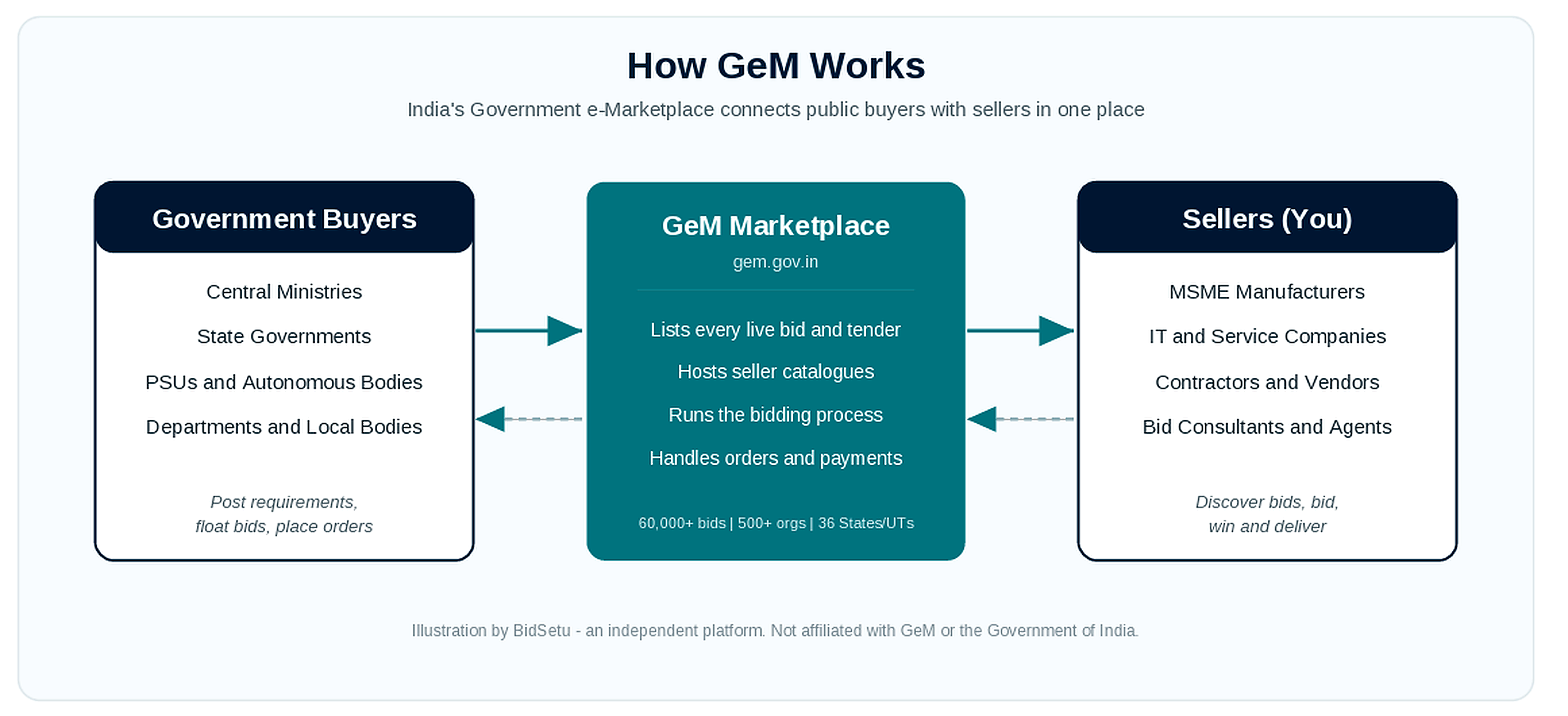
There are two ways a buyer gets what they need. For small, standard items they buy directly from the catalogue — searching listed products and ordering one, much like any shopping site. For larger or more specific needs they float a bid (tender) or run a reverse auction, spelling out exactly what they want; sellers then compete to supply it. Either way, the order is placed, tracked, and paid for online.
The three buying modes — and why they matter to you
Which route a buyer must take depends on the order value (set by the General Financial Rules):
- Up to ₹25,000 — direct purchase. The buyer can pick any listed product that meets the requirement and order it outright.
- ₹25,000 to ₹5 lakh — L1 comparison. The buyer must choose the lowest-priced (L1) option among at least three different manufacturers on GeM.
- Above ₹5 lakh — bid or reverse auction. The buyer must run an online bid or reverse auction and award to the lowest eligible price. (These tools can be used below ₹5 lakh too; automobiles have a higher ₹30 lakh limit.)
The takeaway for a seller: the bigger, more valuable orders almost always go through bids and reverse auctions. That's where the real business is — and exactly why finding and reading the right tenders fast is what separates winners from the rest.
How the winner is decided
Winning on GeM isn't always about being the cheapest — it depends on the method the buyer picked:
- L1 (lowest price). The default for most product bids. The lowest eligible bid that meets the requirement wins.
- QCBS (Quality- and Cost-Based Selection). Common for services and consultancy. Your technical quality is scored alongside price — so a slightly higher quote can still win if your proposal is stronger.
- Reverse auction. Shortlisted sellers compete live, lowering their quoted price as the clock runs down. The lowest eligible bid when it closes wins — so know your floor before you go in.
The practical point: read the bid to see how it will be judged. Bidding the same way on an L1 product tender and a QCBS service tender is how capable sellers lose winnable work.
From order to payment
This is where GeM is very different from the private market. Once you win the order:
- You deliver the goods or service to the buyer's consignee.
- The consignee issues a PRC (Provisional Receipt Certificate) within about 48 hours of receiving it, then a CRAC (Consignee Receipt and Acceptance Certificate) within 10 days of delivery — the formal "received and accepted" record.
- Payment is due within 10 days of the CRAC. If the buyer delays beyond that, they owe penal interest — 1% per month — on the late amount.
So payment isn't a favour you have to chase — it's a time-bound, rule-backed step in the process. For a small business used to waiting months on private clients, that predictability alone is one of the biggest reasons to be on GeM.
Who's on GeM?
Buyers are public-sector organisations only:
- Central government ministries and departments
- State governments and their departments
- Public Sector Undertakings (PSUs) like BHEL or Oil India
- Autonomous bodies, local bodies, and the armed forces
And these aren't cold leads. Every buyer is a verified, registered government body, and the budget is sanctioned before a bid even goes live. You're selling to customers who are funded and ready to buy — not prospects you have to chase down and qualify.
Sellers are where it gets interesting — because "seller" here doesn't mean "big company." The buyer never sees your office size. They see your bid. The businesses winning GeM orders today span the whole spectrum:
- Large manufacturers and brands supplying in bulk — vehicles, IT hardware, heavy equipment.
- MSMEs and small factories — furniture, uniforms, safety gear, electronics, and more.
- IT and service companies — software, AMC, networking, manpower, housekeeping.
- Contractors and local vendors — civil, electrical, interiors, printing, daily supplies.
- A single person with a GST number — a trader, a small fabricator, or a freelancer working from one room.
Wondering whether the government even buys what you sell? Almost certainly. A quick sense of who buys what:
- Furniture & fixtures → schools, offices, hospitals
- Computers, printers & IT → nearly every department
- Housekeeping, security & manpower → large complexes, PSUs, hospitals
- Printing & stationery → every government office
- Uniforms & safety gear → police, railways, defence
- Medical supplies & equipment → hospitals and institutes like AIIMS
If the government uses it, someone on GeM supplies it — goods and services alike.
Here's the part most people miss: a tender from the Ministry of Defence, AIIMS, or the Railways doesn't automatically go to the biggest name. It goes to the bid that meets the requirements at the right price — and the rules even tilt the field toward small businesses, with tenders reserved for MSEs and price preference (more on that below). So the real question isn't "am I big enough to supply the armed forces?" It's "can I find the right tender and put together a bid that wins?" That part is learnable — and it's what the rest of this guide is about.
What you need to get started
Good news: creating a seller account on GeM is free, and starting out is lighter than most people assume. You can register, build your profile, and browse every live bid before spending a rupee or buying any special hardware. Here's what you actually need, in the order it matters.
To register and browse tenders — the basics:
- A registered business with PAN. Proprietorship, partnership, or company — whatever you have. The PAN is how GeM verifies the business.
- An Aadhaar-linked mobile and an email. Signup verifies the authorised person by OTP, so use a number and inbox you actually check.
- A bank account in the business's name. You add it to your profile — it's where order payments land.
That's enough to create your account, list your catalogue, and see every live bid on GeM. And note this clearly: you do not need a DSC to register or to browse tenders. A lot of sellers stall right here, thinking they must buy a digital signature first — you don't. Set the account up and look around freely.
To unlock the small-business advantages — optional, but worth it:
- Udyam registration. Free, and it's what unlocks the MSE benefits — EMD exemption, reserved tenders, and purchase preference. You can sell without it, but you'd be leaving real advantages on the table. If you qualify, do it.
- GST, if your business is registered for it (many categories require it).
Only when you're ready to actually bid:
- A Class 3 DSC. The Digital Signature Certificate — a USB hardware token — is needed to legally sign and submit a bid. You can set everything else up and browse for as long as you like first, then arrange the DSC before your first submission.
So the practical order is simple: register with PAN, mobile, email, and bank → add Udyam and GST → browse bids and decide what's worth going after → get your DSC when you're ready to bid.

The seller's journey, step by step
Here's the full path from signing up to getting paid:
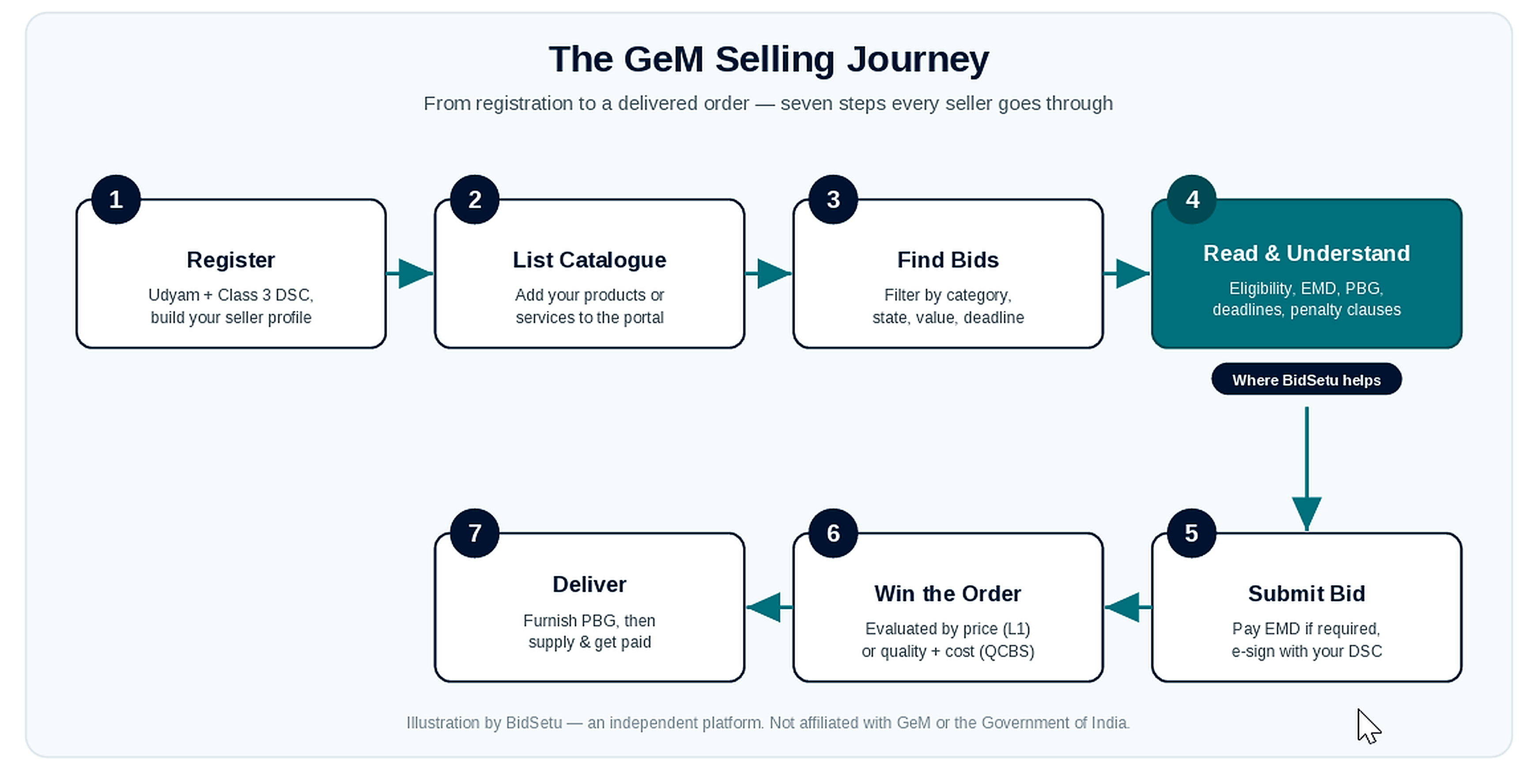
- Register. Create your seller account with PAN, bank details, and — if you qualify — Udyam. No DSC needed at this stage.
- List your catalogue. Add the products or services you sell, mapped to GeM's categories, with your prices. This is how buyers find you for direct, lower-value purchases.
- Find relevant bids. Filter the live bids by category, state, value, and deadline down to the handful you can actually win. Chasing every bid is a classic beginner trap — picking the right ones is the skill.
- Read and understand the tender. The make-or-break step. Check eligibility, EMD, deadlines, and penalty clauses before you commit time to a bid.
- Submit your bid. Post the EMD if it's required (registered MSEs are often exempt), then e-sign and submit with your Class 3 DSC before the deadline.
- Win the order. Bids are decided by lowest price (L1) or quality-plus-cost (QCBS), depending on the tender.
- Deliver and get paid. Furnish the PBG if required, supply the order, and once the buyer issues the CRAC, payment is due within 10 days.
Steps 1 and 2 are one-time setup; steps 3 to 7 repeat for every bid. This whole guide is built around getting steps 3 and 4 right — finding the right bids and reading them correctly — because that's where most orders are genuinely won or lost.
Finding bids on GeM
Every live bid on GeM is public — you can browse the full list without even logging in. You can filter by category, organisation, state, city, value, and deadline, and each listing shows the bid number, the items wanted, the buying department, and the start and end dates.
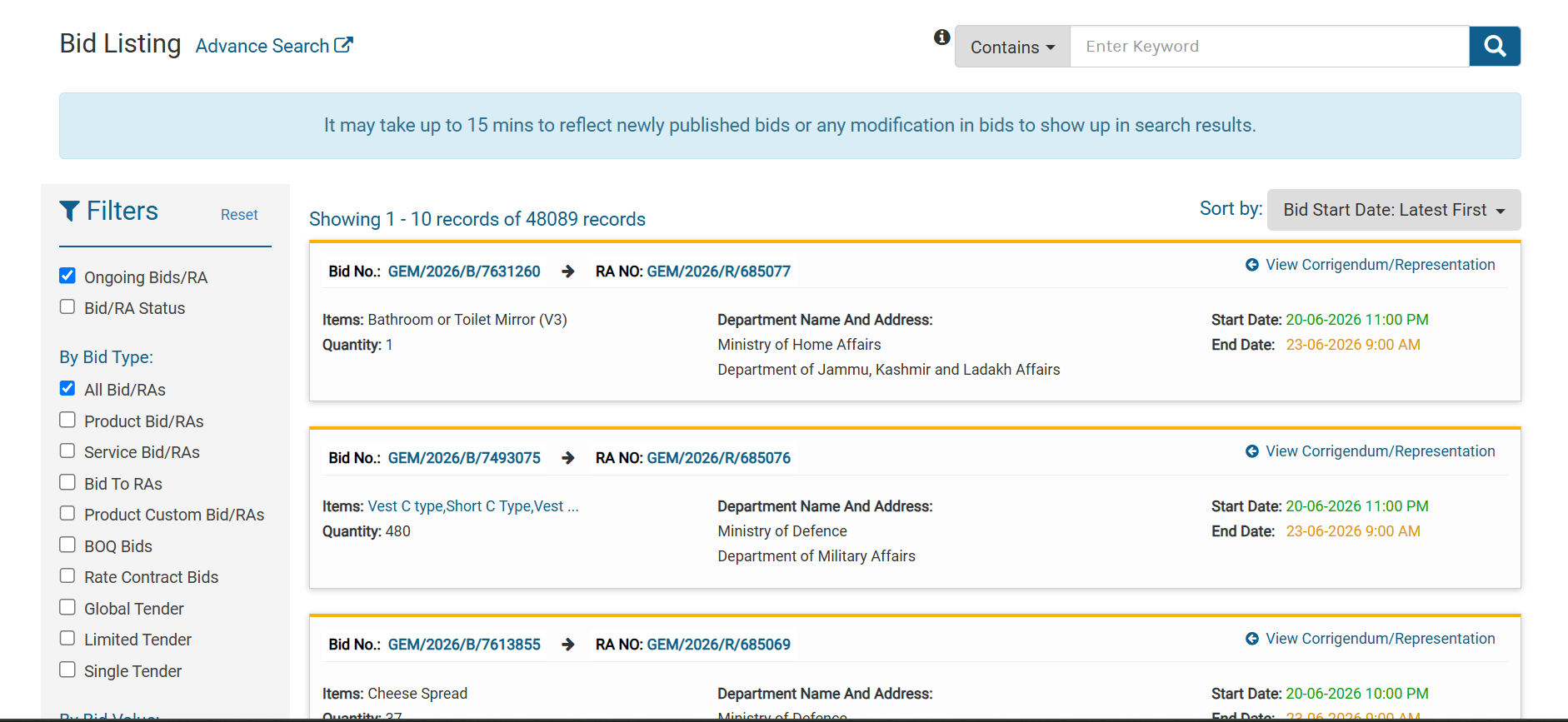
The real challenge isn't finding bids — it's that there are tens of thousands live at any time. Winning starts with narrowing fast to the few you can actually win. A handful of filters do most of the work:
- Your category — start here; it cuts the list dramatically.
- Value — match bids to what your business can realistically deliver, so you're not chasing orders that are too big or too small.
- State / city — delivery location affects your cost and sometimes your eligibility.
- MSE-reserved bids — if you're a registered MSE, filtering to reserved tenders means less competition: you're only up against other small firms.
- End date — leave enough time to prepare a proper bid, not a rushed one.
Two habits that save you: set up alerts so new matching bids come to you instead of you refreshing the portal every day, and don't try to read every bid — skim to a shortlist, then go deep only on the ones worth it.
Because the problem most sellers actually hit is the next step: each shortlisted bid is a long, dense PDF. Which brings us to the part that decides everything.
Understanding a tender — the part that decides everything
This is where bids are won or lost. A single GeM tender can run dozens of pages of legal and technical language, and the details that decide whether you should even bid are scattered through it. Miss one and you've either wasted days on a bid you were never eligible for, or won an order that loses you money.
Here's the kind of thing buried in every tender:
- Eligibility — minimum turnover, years of experience, certifications, and OEM authorisation. Fail any one and you're out.
- EMD and PBG — the deposit to bid and the guarantee if you win. Each tender sets its own, and some waive them entirely.
- Scope and technical specs — exactly what must be supplied, and to what standard.
- Deadlines and penalty clauses — submission and delivery dates, and what late or short delivery costs you.
The criteria you'll see in almost every bid
A handful of criteria repeat across nearly every GeM tender. Learn to spot these five and you can size up most bids at a glance:
- Bidder turnover — a minimum average annual turnover, usually over the last 3 years.
- Years of experience — how long you must have done the same or similar work.
- Past Performance — the share of similar past orders you must have completed successfully, often given as a percentage.
- OEM authorisation — if you resell, the manufacturer's authorisation (MAF), and sometimes the OEM's own turnover.
- MSE / startup relaxation — whether the bid relaxes turnover and experience for small firms or startups (a plain Yes/No).
We break down what each of these means — and the mistakes sellers make on them — in Common beginner mistakes below.
What it looks like in a real tender
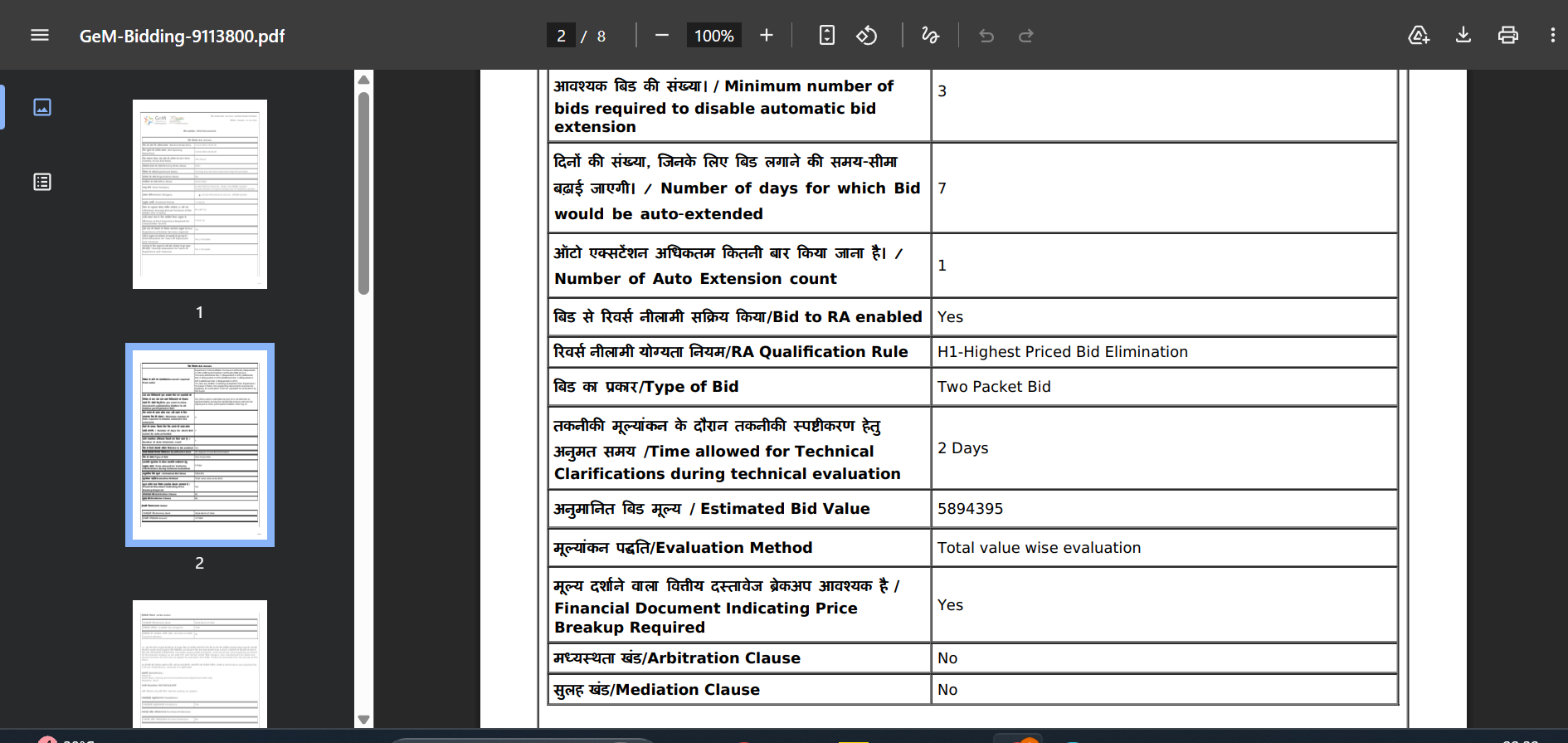
Take an actual GeM tender — one for a Potable Water Purification System. Tucked inside its conditions are the things that quietly decide your fate:
- Minimum average turnover of ₹10 lakh (last 3 years) and 2 years of experience. Fall short and you're simply not eligible.
- "MSE Relaxation: No." This is the trap. A lot of sellers assume MSE status always relaxes turnover and experience — here it doesn't. Your MSE benefits depend on each bid, not a blanket rule.
- OEM Authorisation Certificate required. If you're reselling a manufacturer's product, you need their authorisation (an MAF). No authorisation, no bid.
- Payment in 20 days, not the usual 10. This tender overrides GeM's default payment window — proof you can't assume the standard terms and have to read the actual document.
- A 98% uptime warranty with service visits every six months. A real, ongoing cost commitment hidden in the "special terms," easy to miss if you're only looking at the price.
This particular tender needed no EMD and no PBG — but you'd only know that by reading it. Bidding the same way on the next one, which does require them, is exactly how money gets lost.
Why this is where time is won or lost
Reading all of this, correctly, for every shortlisted bid, is slow and easy to get wrong. It's the single biggest reason capable businesses lose tenders they could have won — or win ones they should never have touched. This is the exact step BidSetu was built for: our AI reads the tender PDF and pulls out the eligibility, EMD, PBG, deadlines, and penalty clauses for you, so you can decide in seconds instead of an hour.
Bidding, winning, and delivering
You've found a good bid and read it carefully. Now you actually place your bid. Here's how that works, in plain steps.
One packet, or two?
GeM bids come in two formats, and it changes how you submit:
- Single-packet bid. You submit everything together — your documents and your price in one go. Common for straightforward product bids.
- Two-packet bid. Your bid is split in two: a technical packet (your documents and proof you qualify) and a financial packet (your price). The buyer opens the technical packet first and checks who's eligible — then only the qualifying bidders' prices are opened. Normal for services and bigger or more complex tenders.
The lesson: in a two-packet bid, a great price means nothing if your technical documents don't pass. Get the documents right first.
What you upload
This is where the criteria from the last section come back. The tender lists the documents it wants — usually proof of your turnover, experience, and past performance, plus the OEM authorisation (MAF) if you resell, and any certificate it specifically asks for. Upload every one. A single missing document disqualifies you even if your price would have won.
How to quote
Your price is the part most sellers rush — and it's where the margin quietly disappears. Quote against your real cost of fulfilling the order, not just the headline value. Build in:
- the cost of any warranty or service obligations,
- the PBG you'll lock up if you win,
- any penalties for late or short delivery,
- and taxes — including whether reverse charge (RCM) applies.
A bid you win at a price that loses you money is worse than a bid you skip.
Submit — and submit early
E-sign and submit with your DSC before the deadline. Don't leave it to the last hour: the portal gets busy near close, uploads can stall, and one missed click is a lost bid. Submit with time to spare, and confirm it actually went through.
After you win
You'll get the order. From there it's deliver → the buyer accepts (CRAC) → payment, on the timeline we covered earlier — and you furnish the PBG first if the tender asks for it.
MSME benefits on GeM
If your business is a registered Micro or Small Enterprise (MSE), the rules are tilted in your favour — and on GeM these advantages are built right into the platform. There are three big ones.
1. EMD exemption
Registered MSEs are generally exempt from paying the EMD — the refundable deposit you'd otherwise post on every bid. That keeps your working capital free for actually delivering orders. One catch: this usually covers MSE manufacturers and service providers; pure traders are often excluded. And some tenders waive the relaxation, so always check the bid.
2. Reserved procurement — the 25% rule
By law, central government bodies and PSUs must source at least 25% of their annual purchases from MSEs. Within that 25%, a slice is set aside further: 4% for SC/ST-owned MSEs and 3% for women-owned MSEs. In plain terms, a quarter of all this demand is earmarked for small businesses — that's a legal floor, not a favour.
3. Purchase preference — the "L1 + 15%" rule
This is the one that actually wins orders. If a non-MSE is the lowest bidder (L1) and your MSE quote is within 15% of that price, you get the chance to match the L1 price and still supply at least 25% of the order. So you don't always have to be the cheapest to win a share — being close, as an MSE, is often enough.
How you actually get these
None of it is automatic. Two things unlock it:
- Udyam registration — free, and the single document that proves you're an MSE.
- Reading each bid — these benefits apply per tender, and some tenders relax the criteria while others don't (remember the "MSE Relaxation: No" line from earlier). Never assume; confirm it in the document.
Common beginner mistakes
Most lost bids on GeM aren't about price — they're avoidable mistakes made before the bid is even submitted. Here are the ones that catch new sellers most often.
- Bidding before checking eligibility — and misreading "Past Performance." Three numbers sink most first bids, and they're the criteria we flagged earlier:
- Turnover — the tender sets a minimum average annual turnover, usually over the last 3 years. A newer or smaller business simply won't clear it.
- Years of experience — you must have done the same or similar work for a set number of years. No track record, no entry.
- Past Performance — the most misread one. It's the share of similar orders you must have already completed successfully — "20%", for example, means you've previously delivered at least that much of this kind of work. A first-timer with no history can't meet it, no matter how sharp the price.
- Assuming MSE benefits apply to every bid. This is the "MSE Relaxation: No" trap. EMD exemption and relaxed turnover/experience are not automatic. Every tender states whether MSE relaxation applies — and when it says "No," you must meet the full criteria like any large firm. Check that line in each bid; never assume.
- Reselling without OEM authorisation (MAF). If you don't manufacture the product yourself, many bids require an OEM Authorisation (MAF) — a letter from the brand authorising you to supply it. No authorisation, no bid, even if you'd have won on price. OEMs can take days to issue one, so arrange it before the deadline, not after.
- Registering under the wrong activity. Trader vs manufacturer vs service provider isn't just a label — it changes your benefits. EMD exemption, for instance, covers MSE manufacturers and service providers but usually not pure traders. Register under the activity that actually fits your business.
- Quoting on the headline value and ignoring hidden costs. A bid can look profitable and still lose you money once you add the PBG you lock up, penalty clauses for delays, warranty or service obligations, and taxes. Quote against your real cost of fulfilling the order, not the sticker number.
- Letting your DSC expire mid-tender. An expired Digital Signature Certificate blocks your submission at the worst possible moment. Go for a 2-year DSC and renew it before it lapses.
- Leaving submission to the last minute. The portal gets busy near a deadline, uploads stall, and one missed click means a lost bid. Submit with time to spare and confirm it went through.
- Chasing every bid. Winning on GeM is about picking the few bids you can genuinely win, not bidding on everything. Spreading thin is how new sellers burn out with nothing to show.
Key terms, in one place
Every term used in this guide, in plain English. Bookmark this — it's the jargon you'll meet again and again on GeM.
The platform and who runs it
- GeM — Government e-Marketplace; the government's official online portal for buying goods and services.
- GeM SPV — the government-owned, non-profit company that runs GeM.
- DGS&D — the old paper-based government purchase department that GeM replaced in 2016.
Registrations and who can sell
- MSME — Micro, Small and Medium Enterprise.
- MSE — Micro and Small Enterprise; the subset of MSMEs that gets most of the procurement benefits.
- Udyam — India's free MSME registration; the document that proves you're an MSE.
- OEM — Original Equipment Manufacturer; the company that actually makes the product.
- MAF — Manufacturer Authorisation Form; a letter from the OEM authorising a reseller to bid for their product.
- DSC — Digital Signature Certificate; the Class 3 USB token you use to legally sign and submit bids.
The money terms
- EMD — Earnest Money Deposit; the refundable deposit you post to bid (MSEs are often exempt).
- PBG / ePBG — Performance Bank Guarantee (e = electronic); furnished after you win, to guarantee you deliver.
- RCM — Reverse Charge Mechanism; a GST rule where the buyer pays the GST instead of the seller.
What tenders ask for (eligibility)
- Turnover — your minimum average annual revenue, usually over the last 3 years.
- Years of experience — how long you must have done the same or similar work.
- Past Performance — the share of similar orders you must have already completed successfully (often a percentage).
- MSE / Startup Relaxation — whether a bid waives the turnover/experience rules for small firms or startups (a Yes/No in the tender).
- ATC — Additional Terms and Conditions; the buyer's extra, tender-specific rules and required certificates.
How a winner is chosen
- L1 — the lowest eligible price; wins most product bids.
- QCBS — Quality- and Cost-Based Selection; quality is scored alongside price (common for services).
- Reverse auction (RA) — sellers compete live, lowering their price until the clock runs out.
- Purchase preference — the "L1 + 15%" rule that lets an MSE match the lowest price and supply a share of the order.
The buying and delivery process
- Bid / Tender — a posted requirement that sellers compete to supply (the two words are used interchangeably).
- Direct purchase — buying a listed product outright, used for small, low-value orders.
- Catalogue — your products or services listed on GeM.
- Two-packet bid — a bid split into a technical packet (your documents) and a financial packet (your price), opened in that order.
- Consignee — the office or person that receives the goods on the buyer's side.
- PRC — Provisional Receipt Certificate; issued by the consignee about 48 hours after delivery.
- CRAC — Consignee Receipt and Acceptance Certificate; the formal "received and accepted" record that triggers your payment.
- Penalty / liquidated damages — what you're charged for late or short delivery.
How BidSetu helps
Finding a bid is easy. Understanding it — and deciding if it's worth your time — is the hard part. That's what we built BidSetu for. Here's what you get:
- Real-time bid discovery. Every live bid on GeM in one place. Filter by category, organisation, state, city, value, or deadline.
- AI bid dissection. Our AI reads each tender and pulls out the key parts — eligibility, EMD, PBG, scope, deadlines, penalty clauses — so you understand a bid in seconds, not an hour.
- Chat with any bid. Ask a tender questions in plain English — "Are MSEs eligible?" or "What's the EMD?" — and get a straight answer.
- Smart alerts. Save your filters and get an email or WhatsApp alert the moment a matching bid goes live — instant, daily, or weekly.
- Bid tracking board. Bookmark bids, mark them applied, and track your whole pipeline in one view.
- Pricing intelligence. See the prices that won past bids in your category, so you can quote with data instead of guessing.
- Bid winners database. Look up who won what, and at what price — know your competition before you bid.
- Market intelligence. Spot trends across sectors, departments, and states — which buyers are active, and where your best openings are.
- Document checklist. Get the exact list of documents a bid needs, and generate the standard supporting paperwork to go with it.
The one thing we don't do is submit the bid for you. That last step is signed with your DSC token, by law — so it stays in your hands. BidSetu does the heavy lifting before it: finding, reading, deciding, and preparing — so you spend your time only on the bids worth winning.
GeM in one line
GeM is India's official online marketplace where the government buys and registered businesses sell — a huge, transparent, MSME-friendly market where the winners are the sellers who can find the right bids and understand them fast.
BidSetu is an independent platform that indexes publicly available GeM data. We are not affiliated with GeM or the Government of India.